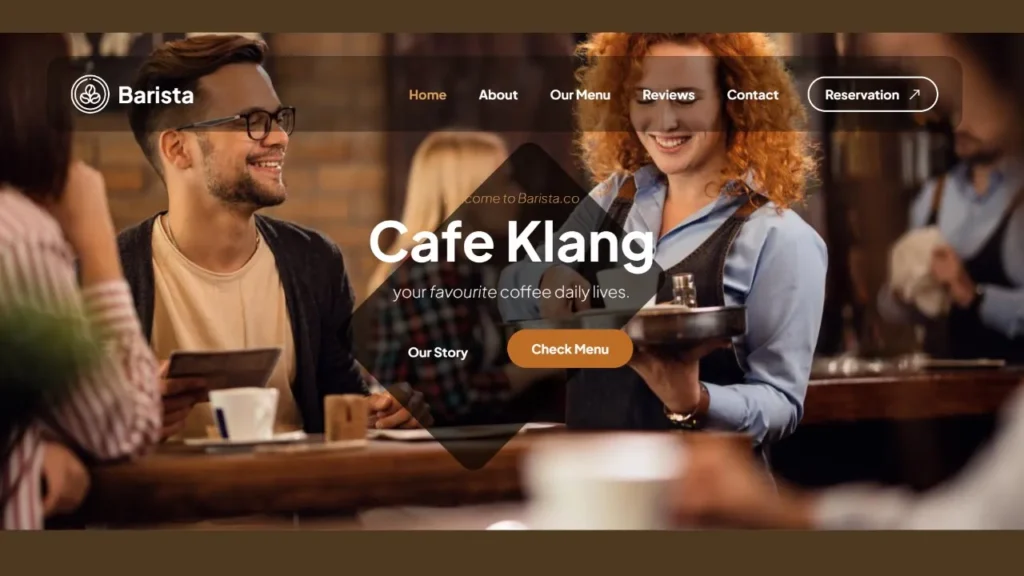
Complete Coffee Shop - Cafe House Website Design Template Using HTML 100% Free
213 Downloads
Welcome to our barista restaurant’s website, where culinary excellence meets barista to offer you an unforgettable foodies experience. our restaurant invites you on a beautiful journey like no other we are user friendly and also responsive.
Step into our welcoming space and feel yourself in the warm and inviting atmosphere eco-freindly. Whether you’re seeking an intimate dinner for two restaurant website template,restaurant template,responsive template, a lively gathering with friends, or a special celebration with family, our restaurant sets the perfect stage for every occasion as per your requrimets.
Prepare to tenstive your taste buds with our diverse menu crafted with passion and creativity by our talented chefs,creative website, new responsive website. From savory starters to mouthwatering mains and decadent desserts, each dish is thoughtfully prepared using the finest ingredients sourced locally and globally, ensuring an explosion of flavors with every bite and every movment.
Complementing our delectable offerings is an extensive wine list featuring carefully curated selections from renowned vineyards around the world. Let our knowledgeable staff guide you through the perfect pairing to enhance your dining experience further.
At our restaurant, hospitality is more than just a service—it’s a commitment to exceeding your expectations.Error page, reloading, food template Our friendly and attentive team is dedicated to ensuring your comfort and satisfaction from the moment you arrive until the last sip of your after-dinner espresso’s.
Whether you’re a connoisseur seeking culinary delights or simply looking for a memorable dining experience, we invite you to join us at our restaurant and indulge in a different types of flavors that will leave you craving for more. Explore our website barista to learn more about our menu, upcoming events, and reservation options and many more.
Features of our Free Template
- Signature Dishes
- Interactive Dining Experience
- Customizable Menus
- Farm-to-Table Philosophy
- Craft Cocktails and Mixology
- Spectacular Views
- Family-Friendly Atmosphere
- Themed Dining Events
- Community Engagement
- Exceptional Hospitality
- Seamless Reservation System
- Private Chef’s Table Experience
Local Setup Guide
Follow these simple steps to download and run this project on your computer. This guide is beginner-friendly and perfect for students who are learning web development and working on college projects.
Step 1: Download the Project from GitHub
First, open the GitHub repository link of the project.
Click on the Code button and then select Download ZIP to download the project files to your computer.
You can also clone the repository using Git:
git clone https://github.com/rjksharma/project-name.git
Step 2: Extract the ZIP File
If you downloaded the ZIP file, extract it using any file extractor software like:
• WinRAR
• 7-Zip
• Windows Extract Tool
After extracting, open the project folder.
Step 3: Open the Project in VS Code
Download and install Visual Studio Code if you do not already have it installed.
Open VS Code and click on:
File → Open Folder
Select the extracted project folder.
Step 4: Install Live Server Extension
To run the project smoothly in your browser, install the Live Server extension in VS Code.
How to Install:
1. Open VS Code
2. Go to Extensions
3. Search for Live Server
4. Click Install
Step 5: Run the Project
Inside the project folder, locate the index.html file.
Right-click on index.html and select:
Open with Live Server
Your project will automatically open in the browser.
Step 6: Customize the Website
You can now edit:
• Text content
• Images
• Colors
• Sections
• Buttons
• Layout
All files are beginner-friendly and easy to customize for personal projects, portfolio websites, and college submissions
Requirements
Before running the project, make sure you have:
• A modern web browser (Chrome, Edge, Firefox)
• Visual Studio Code
• Internet connection (optional for fonts/icons)
Troubleshooting
If the project is not opening properly:
• Make sure all files are extracted correctly
• Check that index.html exists in the root folder
• Try reopening the project in VS Code
• Ensure Live Server is installed properly
Final Note
This free project source code is shared for educational and learning purposes. Students and beginner developers can use it to improve their frontend development skills and understand real-world website structure and design.