Choco Lux | E-commerce Static Website Temolate
132 Downloads
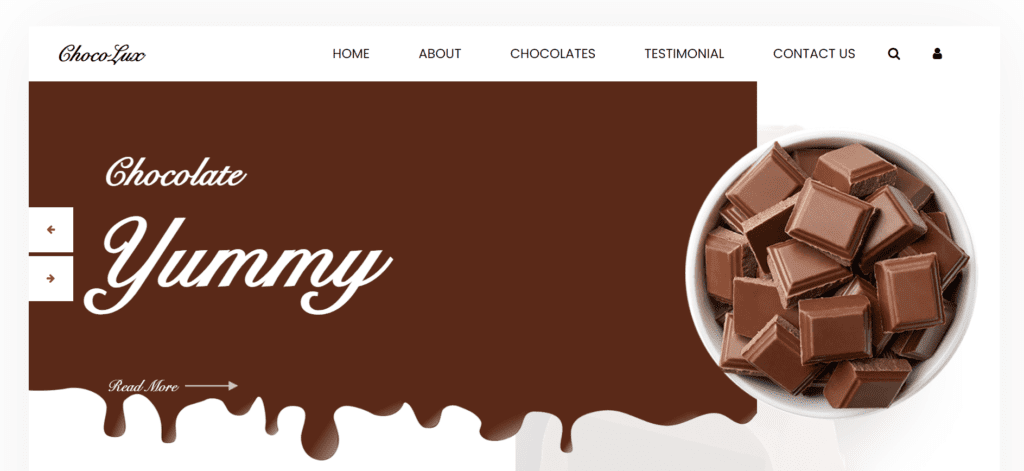
Welcome to Choco lux website template, your ultimate destination for culinary inspiration, delicious recipes, and all things food-relaed iteam and also the deserts. This template is a user-friendly website, and a responsive template. Whether you’re a seasoned chef looking for creative new dishes or a novice cook eager to learn the basics, our platform has something for everyone.
At Choco lux website, we’re passionate about food and believe that cooking should be enjoyable, accessible, and rewarding for all. That’s why we’ve curated a diverse collection of recipes, cooking tips, and culinary resources to help you unleash your inner chef and elevate your home cooking game. Explore thousands of mouthwatering recipes spanning cuisines from around the world, including appetizers, entrees, desserts, and everything in between. From quick and easy weeknight meals to impressive dishes for special occasions, you’ll find endless inspiration to satisfy your cravings and impress your family and friends.
It is not just a choclate website template, but we’re more than just a recipe database – we’re a community of food lovers united by our shared passion for great food and good company. It is coded with many programming languages such as Html, Css, Java, Javascript, and many other programming languages. Join us as we celebrate the joys of cooking and enjoying the meal with a proper variety and taste, share our favorite kitchen hacks, and exchange tips and tricks to help each other become better cooks. Whether you’re seeking healthy meal ideas, indulgent treats, or culinary adventures to challenge your skills, Choco lux is your go-to source for all things food and deserts. So grab your apron, sharpen your knives, and let’s embark on a delicious journey together. Ready to get cooking? Dive into our collection of recipes, browse our Choco lux chocolate guides, and join the conversation in our vibrant community forums. With Choco lux as the possibilities are endless – and the flavors are unforgettable.
Features of our Free Template
- Seasonal and Special Occasion Recipes
- Cooking Videos and Tutorials
- Mobile-Friendly Design
- Cooking Videos and Tutorials
- Cooking Tips and Techniques
- Community Interaction
- Meal Planning Tools
- Step-by-Step Instructions
- Search and Filter Functionality
- Extensive Recipe Database
Local Setup Guide
Follow these simple steps to download and run this project on your computer. This guide is beginner-friendly and perfect for students who are learning web development and working on college projects.
Step 1: Download the Project from GitHub
First, open the GitHub repository link of the project.
Click on the Code button and then select Download ZIP to download the project files to your computer.
You can also clone the repository using Git:
git clone https://github.com/rjksharma/project-name.git
Step 2: Extract the ZIP File
If you downloaded the ZIP file, extract it using any file extractor software like:
• WinRAR
• 7-Zip
• Windows Extract Tool
After extracting, open the project folder.
Step 3: Open the Project in VS Code
Download and install Visual Studio Code if you do not already have it installed.
Open VS Code and click on:
File → Open Folder
Select the extracted project folder.
Step 4: Install Live Server Extension
To run the project smoothly in your browser, install the Live Server extension in VS Code.
How to Install:
1. Open VS Code
2. Go to Extensions
3. Search for Live Server
4. Click Install
Step 5: Run the Project
Inside the project folder, locate the index.html file.
Right-click on index.html and select:
Open with Live Server
Your project will automatically open in the browser.
Step 6: Customize the Website
You can now edit:
• Text content
• Images
• Colors
• Sections
• Buttons
• Layout
All files are beginner-friendly and easy to customize for personal projects, portfolio websites, and college submissions
Requirements
Before running the project, make sure you have:
• A modern web browser (Chrome, Edge, Firefox)
• Visual Studio Code
• Internet connection (optional for fonts/icons)
Troubleshooting
If the project is not opening properly:
• Make sure all files are extracted correctly
• Check that index.html exists in the root folder
• Try reopening the project in VS Code
• Ensure Live Server is installed properly
Final Note
This free project source code is shared for educational and learning purposes. Students and beginner developers can use it to improve their frontend development skills and understand real-world website structure and design.