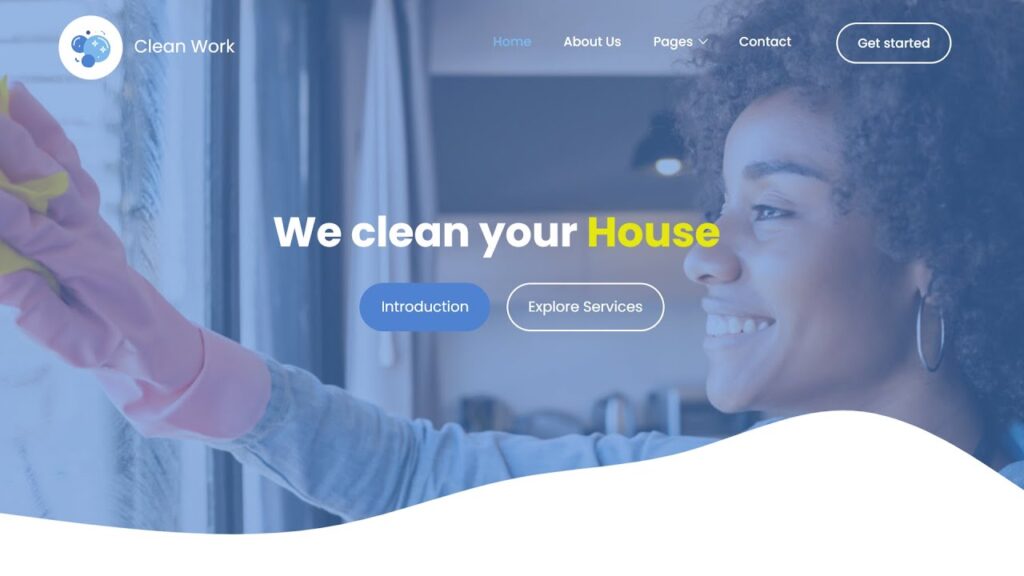
Cleaning Services Template Website Design - HTML -CSS - JavaScript - Complete Website Code

e-commerce website template
Date Of Publish 07/01/2024

754 Downloads

Transform your living or working space into a sanctuary of cleanliness and serenity with clean work. With over 6years of experience in the cleaning industry, we pride ourselves on delivering the best service in residential, commercial, and specialized cleaning services. Responsive website, responsive template, Cleaning website template, free templates, responsive website, new template. It Clean Work,That’s why our team of highly-trained professionals is dedicated to going above and beyond to ensure your space is not just clean, but immaculate, we understand that a clean environment is essential for your health, productivity, and overall well-being. Our residential cleaning services cater to the unique needs of homeowners, offering everything from routine maintenance to deep cleaning solutions, sanitize your kitchen, or revitalize your entire home, we have the expertise and resources to exceed your expectations.Whether you’re looking to refresh your living room. For businesses, maintaining a clean and hygienic environment is crucial for creating a positive impression on clients and employees alike. Our commercial cleaning services are expect to the specific requirements of your industry, ensuring that your workspace is not only pristine but also conducive to productivity and success. Cleaning website free template, Cleaning website download, website template, Error page, 404 error page

In addition to our standard cleaning offerings, we also specialize in a range of specialized cleaning services, including carpet cleaning, upholstery cleaning, window washing, and more. Whatever your cleaning needs may be, you can trust [Your Company Name] to deliver exceptional results with precision and care.
Customer satisfaction is our top priority, and we strive to exceed your expectations with every service we provide. Our team is committed to professionalism, reliability, and attention to detail, ensuring that you receive the best possible cleaning experience from start to finish.
We understand the importance of sustainability in today’s world, which is why we prioritize the use of eco-friendly cleaning products and practices whenever possible. By choosing Clean work, you can rest assured that your space will be cleaned to the highest standards without compromising the health of your family, pets, or the planet. Experience the difference that Clean Work can make in your home or business. Contact us today to schedule your cleaning appointment and take the first step towards a cleaner, healthier environment for you and your loved ones.

Features of our Free Template

  • Transparent Pricing
  • Responsive Customer Support
  • Quality Assurance
  • Licensed and Insured
  • Customized Cleaning Plans
  • Comprehensive Services
  • Flexible Scheduling
  • Eco-Friendly Practices
  • Satisfaction Guarantee
  • Professional Team

Local Setup Guide

Follow these simple steps to download and run this project on your computer. This guide is beginner-friendly and perfect for students who are learning web development and working on college projects.

Step 1: Download the Project from GitHub
First, open the GitHub repository link of the project.
Click on the Code button and then select Download ZIP to download the project files to your computer.
You can also clone the repository using Git:
git clone https://github.com/rjksharma/project-name.git

Step 2: Extract the ZIP File
If you downloaded the ZIP file, extract it using any file extractor software like:
• WinRAR
• 7-Zip
• Windows Extract Tool
After extracting, open the project folder.

Step 3: Open the Project in VS Code
Download and install Visual Studio Code if you do not already have it installed.
Open VS Code and click on:
File → Open Folder
Select the extracted project folder.

Step 4: Install Live Server Extension
To run the project smoothly in your browser, install the Live Server extension in VS Code.
How to Install:
1. Open VS Code
2. Go to Extensions
3. Search for Live Server
4. Click Install

Step 5: Run the Project
Inside the project folder, locate the index.html file.
Right-click on index.html and select:
Open with Live Server
Your project will automatically open in the browser.

Step 6: Customize the Website
You can now edit:
• Text content
• Images
• Colors
• Sections
• Buttons
• Layout
All files are beginner-friendly and easy to customize for personal projects, portfolio websites, and college submissions

Requirements
Before running the project, make sure you have:
• A modern web browser (Chrome, Edge, Firefox)
• Visual Studio Code
• Internet connection (optional for fonts/icons)

Troubleshooting
If the project is not opening properly:
• Make sure all files are extracted correctly
• Check that index.html exists in the root folder
• Try reopening the project in VS Code
• Ensure Live Server is installed properly

Final Note
This free project source code is shared for educational and learning purposes. Students and beginner developers can use it to improve their frontend development skills and understand real-world website structure and design.