Food and Restaurant Website Template

food website template design
Date Of Publish 14/07/2023

154 Downloads

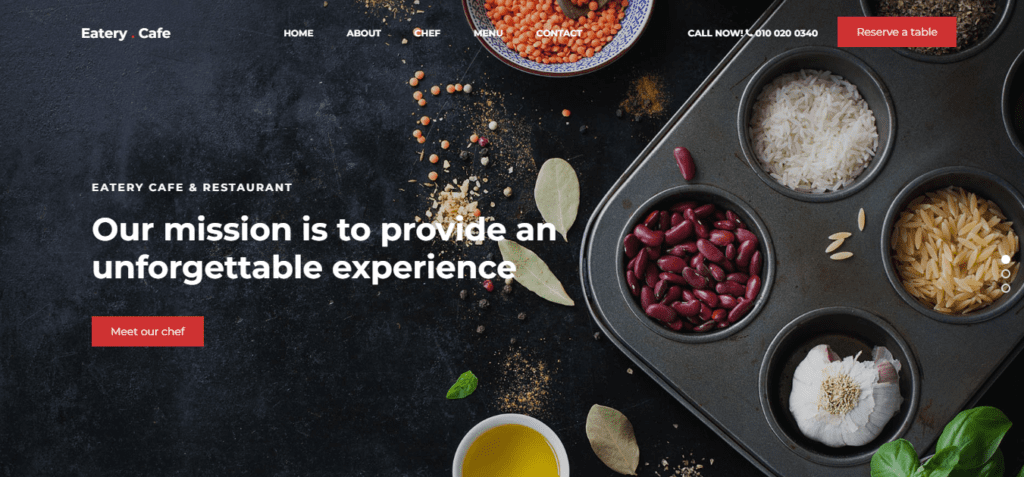
Eatery cafe is an outstanding, modern, and free organic food website template designed for building an impactful and responsive website. Eatery cafe website template is perfectly suited for all food-related websites such as agriculture, farmer, organic product, eco food, food retail, farm, fresh, modern cultivation, natural food, organic vegetable, organic food, fruits, organic fruits, organic life, organic shop, vegetable, and others.

You came to the right place if you are looking for free HTML website templates, as Eatery cafe will be of tremendous help. The template is fully customizable and ready to use. Eatery cafe is to provide the best food experience, free organic products website template also comes with plenty of features and functions for saving you additional time and effort. Starting your organic food business with the Eatery cafe will be your key to success.

Eatery cafe free organic food HTML template is created with the latest web technologies like HTML5, CSS3, SASS, latest JS, and Bootstrap v5 framework. The template is 100% responsive and mobile-friendly. It works well on every mobile, iPod, laptop, and desktop screen. It has an attractive and eye-catchy clean design that includes many visual elements and effects.

Eatery cafe free organic store website template comes with 8+ pre-defined HTML5 template pages for an online presence like Home, About, Product, Blog, Feature, Testimonial, 404 Error, Contact page, etc. You can customize these pages yourself to create a website fully suitable for your business. Eatery cafe is the best choice to launch your organic fruits & vegetable website within a very quick time.
Features of our Free Template

  • Bootstrap v5 framework
  • Google web font support
  • Bootstrap icon font support
  • Easy to use
  • Sortable product area
  • Clean and Well-commented code
  • Developer and SEO-friendly code
  • Testimonial carousel
  • CSS3 hover effects
  • Unique, modern, and flexible layout
  • Compatible with all web browsers
  • Sticky and Mobile-friendly navbar
  • Responsive header carousel
  • Newsletter form
  • Social link with icon
  • Contact form
  • Google map

Local Setup Guide

Follow these simple steps to download and run this project on your computer. This guide is beginner-friendly and perfect for students who are learning web development and working on college projects.

Step 1: Download the Project from GitHub
First, open the GitHub repository link of the project.
Click on the Code button and then select Download ZIP to download the project files to your computer.
You can also clone the repository using Git:
git clone https://github.com/rjksharma/project-name.git

Step 2: Extract the ZIP File
If you downloaded the ZIP file, extract it using any file extractor software like:
• WinRAR
• 7-Zip
• Windows Extract Tool
After extracting, open the project folder.

Step 3: Open the Project in VS Code
Download and install Visual Studio Code if you do not already have it installed.
Open VS Code and click on:
File → Open Folder
Select the extracted project folder.

Step 4: Install Live Server Extension
To run the project smoothly in your browser, install the Live Server extension in VS Code.
How to Install:
1. Open VS Code
2. Go to Extensions
3. Search for Live Server
4. Click Install

Step 5: Run the Project
Inside the project folder, locate the index.html file.
Right-click on index.html and select:
Open with Live Server
Your project will automatically open in the browser.

Step 6: Customize the Website
You can now edit:
• Text content
• Images
• Colors
• Sections
• Buttons
• Layout
All files are beginner-friendly and easy to customize for personal projects, portfolio websites, and college submissions

Requirements
Before running the project, make sure you have:
• A modern web browser (Chrome, Edge, Firefox)
• Visual Studio Code
• Internet connection (optional for fonts/icons)

Troubleshooting
If the project is not opening properly:
• Make sure all files are extracted correctly
• Check that index.html exists in the root folder
• Try reopening the project in VS Code
• Ensure Live Server is installed properly

Final Note
This free project source code is shared for educational and learning purposes. Students and beginner developers can use it to improve their frontend development skills and understand real-world website structure and design.