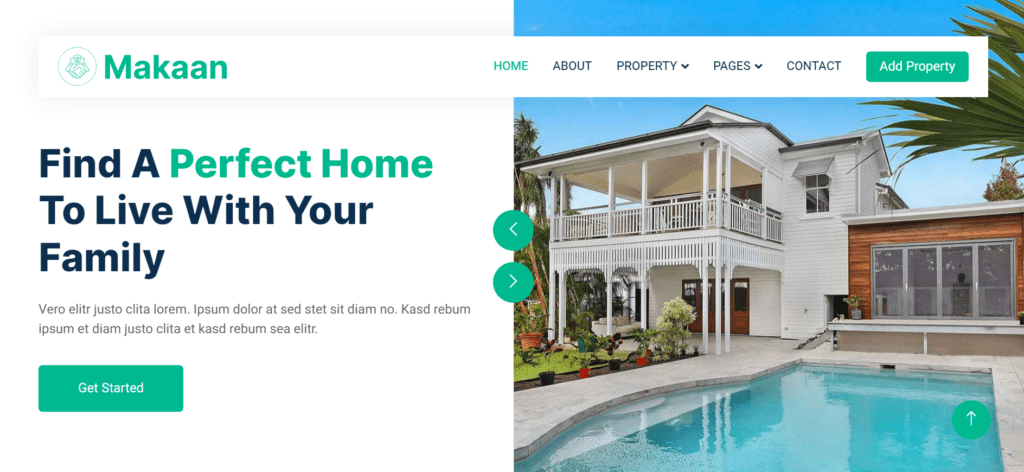
Makaan | Real estate website templates html css javascript Free Template

real estate website template design
Date Of Publish 15/12/2023

312 Downloads

Explore our Makaan website template of exiceting properties that redefine luxury living. From luxurious penthouses with panoramic views to great estates property side, find your dream home with your Estate website template. Discover a diverse range of properties which fit every lifestyle and budget. This website template is mainly made with user friendly experiences, whether you’re a first-time buyer, or a professional investor, or looking for your forever home, we have visited perfect property website template. Simplify your rental search with our user-friendly platform featuring a wide array of rental properties. From urban apartments to various penthouses or individual homes, find the ideal rental that suits your needs and preferences.
Unlock investment opportunities in the real estate market with our portfolio of income-generating properties. From high-yield rental units to promising development projects, capitalize on our expertise to maximize your returns. Gain access to exclusive listings that are not available elsewhere, giving you a competitive edge in today’s competitive market. From off-market gems to pre-construction developments, seize the opportunity to secure your piece of prime real estate.

Navigate the complexities of buying, selling, or renting property with confidence, thanks to our team Makaan of experienced real estate professionals. This website is coded with Html Css Javascript Python, with a great division of template page according to the user convinient. Benefit from personalized guidance, market insights, and unparalleled customer service throughout your real estate journey. Explore vibrant communities and neighborhoods that offer more than just a place to live. Discover amenities, schools, parks, and local attractions that cater to your lifestyle and enhance your sense of belonging.Take a virtual tour of our properties from the comfort of your home, allowing you to explore every detail and envision yourself living in your future home before scheduling an in-person viewing.Experience peace of mind with transparent and seamless transactions facilitated by our team of trusted professionals. From negotiations to closing, we ensure a smooth and easy-free process every step of the way.Whether you’re buying, selling, renting, or investing, we are your trusted partner in real estate. With our unwavering commitment to integrity, professionalism, and client satisfaction, we strive to exceed your expectations and make your real estate goals a reality.

Features of our Free Template

  • Mortgage Calculator
  • Comprehensive Property Details
  • Virtual Tours
  • Agent Contact Information
  • User Reviews and Ratings
  • High-Quality Imagery
  • Interactive Maps
  • Advanced Search Filters
  • Property Alerts
  • Saved Favorites

How to Setup This Project on Your Local Machine

Follow these simple steps to download and run this project on your computer. This guide is beginner-friendly and perfect for students who are learning web development and working on college projects.

Step 1: Download the Project from GitHub
First, open the GitHub repository link of the project.
Click on the Code button and then select Download ZIP to download the project files to your computer.
You can also clone the repository using Git:
git clone https://github.com/rjksharma/project-name.git

Step 2: Extract the ZIP File
If you downloaded the ZIP file, extract it using any file extractor software like:
• WinRAR
• 7-Zip
• Windows Extract Tool
After extracting, open the project folder.

Step 3: Open the Project in VS Code
Download and install Visual Studio Code if you do not already have it installed.
Open VS Code and click on:
File → Open Folder
Select the extracted project folder.

Step 4: Install Live Server Extension
To run the project smoothly in your browser, install the Live Server extension in VS Code.
How to Install:
1. Open VS Code
2. Go to Extensions
3. Search for Live Server
4. Click Install

Step 5: Run the Project
Inside the project folder, locate the index.html file.
Right-click on index.html and select:
Open with Live Server
Your project will automatically open in the browser.

Step 6: Customize the Website
You can now edit:
• Text content
• Images
• Colors
• Sections
• Buttons
• Layout
All files are beginner-friendly and easy to customize for personal projects, portfolio websites, and college submissions

Requirements
Before running the project, make sure you have:
• A modern web browser (Chrome, Edge, Firefox)
• Visual Studio Code
• Internet connection (optional for fonts/icons)

Troubleshooting
If the project is not opening properly:
• Make sure all files are extracted correctly
• Check that index.html exists in the root folder
• Try reopening the project in VS Code
• Ensure Live Server is installed properly

Final Note
This free project source code is shared for educational and learning purposes. Students and beginner developers can use it to improve their frontend development skills and understand real-world website structure and design.