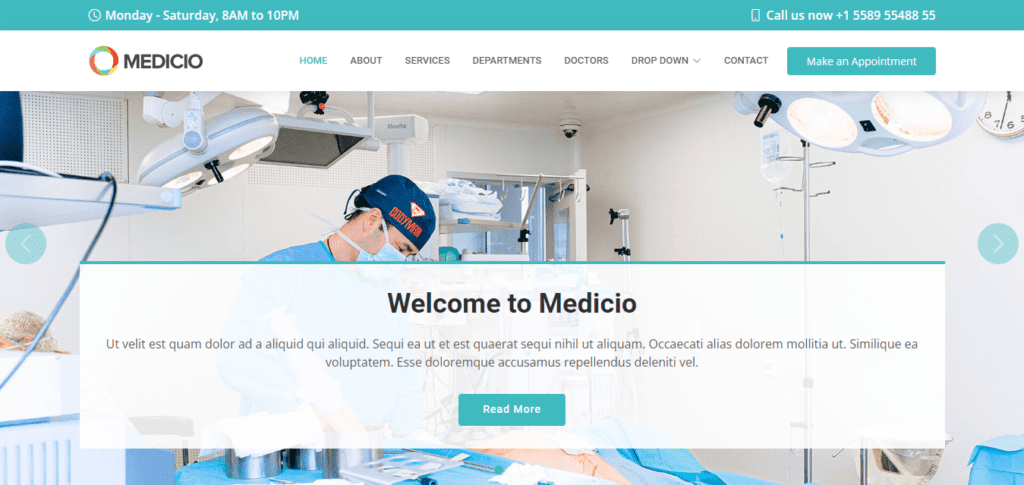
Hospital website template desgin for free | HTML, CSS, Java-scripts hospital website template

Hospital website template
Date Of Publish 04/08/2023

153 Downloads

Welcome to Medicio, your trusted source for reliable and comprehensive medical information. Exploring treatment options website template and also a responsive website or user-friendly website templates, or simply looking to a medical line website templates or to prioritize your health and wellness, our platform is here to support you every step of the way whether you’re seeking insights into a specific condition,
At Medicio, is user-friendly, responsive website, medical website template, and many other pages required for a website template. We understand the importance of accurate and up-to-date medical information in making informed decisions about your health, which help to increase the health in a effective manner. That’s why we provide a vast array of resources, including articles, videos, and expert interviews, covering a wide range of medical topics.
Our team of Medicio medical professionals and content experts works tirelessly to ensure that all information presented on our website is evidence-based, peer-reviewed, and medically accurate. You can trust that the information you find here is reliable and trustworthy doctors, empowering you to take control of your health journey with confidence.

Medicio website template contain pages like Home, Contact, About us, Error pages. Whether you’re researching a specific medical condition, exploring preventative measures, or seeking guidance on lifestyle changes to improve your overall well-being, our platform offers valuable insights and practical advice to help you achieve your health goals and lifecycle. In addition to our educational resources, we also provide tools and resources to help you connect with healthcare providers, find local services, and access telemedicine options, making it easier than ever to prioritize your health and get the care you need, when you need it.
At Medicio we are committed to empowering individuals to make informed decisions about their health and well-being. Explore our website today to discover a wealth of medical information, resources, and support to help you live your healthiest life possible.

Features of our Free Template

  • Health and Wellness Resources
  • Privacy and Security
  • Multimedia Resources
  • Mobile Compatibility
  • Interactive Tools and Calculators
  • Verified Medical Professionals
  • Comprehensive Medical Information
  • User-Friendly Interface
  • Search Functionality

How to Setup This Project on Your Local Machine

Follow these simple steps to download and run this project on your computer. This guide is beginner-friendly and perfect for students who are learning web development and working on college projects.

Step 1: Download the Project from GitHub
First, open the GitHub repository link of the project.
Click on the Code button and then select Download ZIP to download the project files to your computer.
You can also clone the repository using Git:
git clone https://github.com/rjksharma/project-name.git

Step 2: Extract the ZIP File
If you downloaded the ZIP file, extract it using any file extractor software like:
• WinRAR
• 7-Zip
• Windows Extract Tool
After extracting, open the project folder.

Step 3: Open the Project in VS Code
Download and install Visual Studio Code if you do not already have it installed.
Open VS Code and click on:
File → Open Folder
Select the extracted project folder.

Step 4: Install Live Server Extension
To run the project smoothly in your browser, install the Live Server extension in VS Code.
How to Install:
1. Open VS Code
2. Go to Extensions
3. Search for Live Server
4. Click Install

Step 5: Run the Project
Inside the project folder, locate the index.html file.
Right-click on index.html and select:
Open with Live Server
Your project will automatically open in the browser.

Step 6: Customize the Website
You can now edit:
• Text content
• Images
• Colors
• Sections
• Buttons
• Layout
All files are beginner-friendly and easy to customize for personal projects, portfolio websites, and college submissions

Requirements
Before running the project, make sure you have:
• A modern web browser (Chrome, Edge, Firefox)
• Visual Studio Code
• Internet connection (optional for fonts/icons)

Troubleshooting
If the project is not opening properly:
• Make sure all files are extracted correctly
• Check that index.html exists in the root folder
• Try reopening the project in VS Code
• Ensure Live Server is installed properly

Final Note
This free project source code is shared for educational and learning purposes. Students and beginner developers can use it to improve their frontend development skills and understand real-world website structure and design.