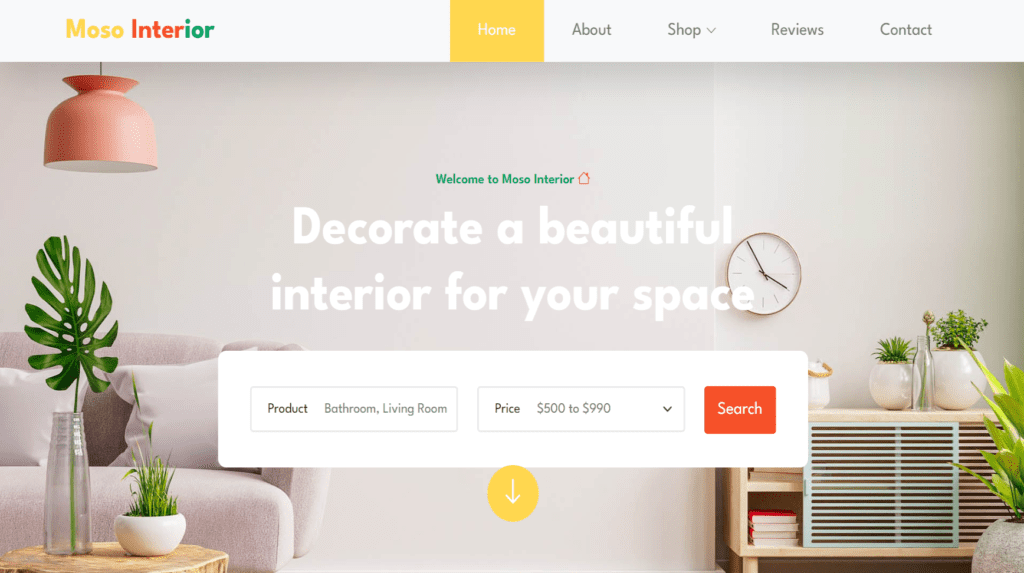
Meso Interior Website Template | Free Template design download source code
231 Downloads
Welcome to our interior design website Meso, where creativity and functionality merge to transform spaces into captivating works of art and special design. This intertior website template is step into a world where aesthetics meet functionality, and every corner tells a story of style and quality.
Discover our portfolio showcasing an eclectic mix of design projects,responsive template, kitechen design and many other interior work Each project is a testament to our commitment to crafting interiors that reflect the unique personalities and lifestyles of our clients while exceeding their expectations.
Immerse yourself in the visual feast of colors, textures, and patterns as you explore our curated collections of furniture, lighting, textiles, and accessories. From timeless classics to cutting-edge designs, our carefully selected pieces are sure to inspire and elevate any space.
At our required design, collaboration is at the heart of everything we do.Download free template of interior design Meso,our team of talented designers works closely with clients to understand their vision, preferences, and practical needs, ensuring that every design concept is comfort to perfection.
Whether you’re seeking a complete home renovation, a stylish office makeover, or simply looking for inspiration to refresh your living space, our website very responsive and elastic as per the user requirment, is your ultimate resource for all things interior design.
HTML website template is especially designed for business, consulting, consulting business,Dive into our blog for expert tips, trends, and insights,reach out to us directly to discuss your next project. Join us on a journey of imagination and innovation as we redefine the art of interior design one space at a time. Welcome to our world of endless possibilities, where every design dream Meso becomes a reality.
Features of our Free Template
- Contact and Inquiry Form
- Online Consultation Booking
- Social Media Integration
- Design Resources and Guides
- Design Style Galleries
- Virtual Tours and Before/After Photos
- Design Blog
- Portfolio Showcase
- Client Testimonials
- Design Services Overview
How to Setup This Project on Your Local Machine
Follow these simple steps to download and run this project on your computer. This guide is beginner-friendly and perfect for students who are learning web development and working on college projects.
Step 1: Download the Project from GitHub
First, open the GitHub repository link of the project.
Click on the Code button and then select Download ZIP to download the project files to your computer.
You can also clone the repository using Git:
git clone https://github.com/rjksharma/project-name.git
Step 2: Extract the ZIP File
If you downloaded the ZIP file, extract it using any file extractor software like:
• WinRAR
• 7-Zip
• Windows Extract Tool
After extracting, open the project folder.
Step 3: Open the Project in VS Code
Download and install Visual Studio Code if you do not already have it installed.
Open VS Code and click on:
File → Open Folder
Select the extracted project folder.
Step 4: Install Live Server Extension
To run the project smoothly in your browser, install the Live Server extension in VS Code.
How to Install:
1. Open VS Code
2. Go to Extensions
3. Search for Live Server
4. Click Install
Step 5: Run the Project
Inside the project folder, locate the index.html file.
Right-click on index.html and select:
Open with Live Server
Your project will automatically open in the browser.
Step 6: Customize the Website
You can now edit:
• Text content
• Images
• Colors
• Sections
• Buttons
• Layout
All files are beginner-friendly and easy to customize for personal projects, portfolio websites, and college submissions
Requirements
Before running the project, make sure you have:
• A modern web browser (Chrome, Edge, Firefox)
• Visual Studio Code
• Internet connection (optional for fonts/icons)
Troubleshooting
If the project is not opening properly:
• Make sure all files are extracted correctly
• Check that index.html exists in the root folder
• Try reopening the project in VS Code
• Ensure Live Server is installed properly
Final Note
This free project source code is shared for educational and learning purposes. Students and beginner developers can use it to improve their frontend development skills and understand real-world website structure and design.