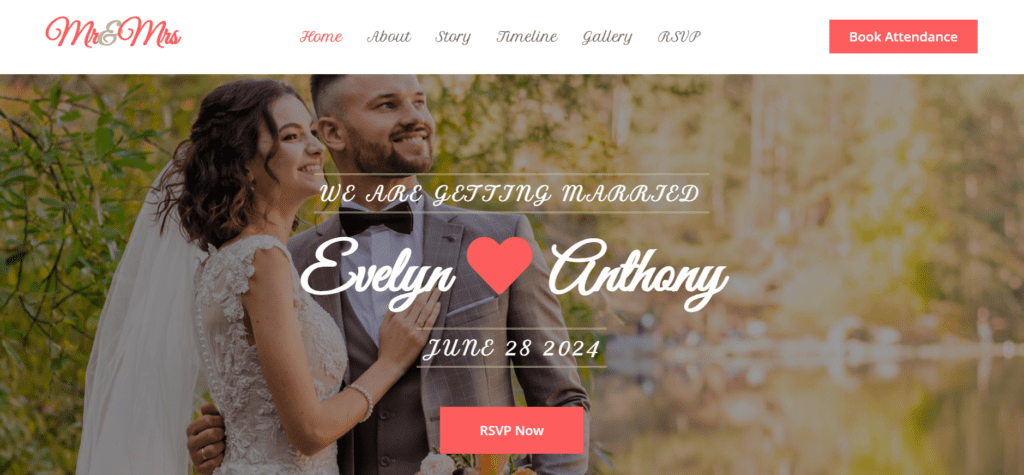
Mr and Mrs | Wedding Website Template Design HTML CSS JavaScript Free source code Website

wedding website template design source code
Date Of Publish 24/11/2024

342 Downloads

Welcome to our enchanting Mr. and Mrs. wedding website template, where dreams become reality and love in every detail. Here in this template there is multiple login according to your category and convenient, we invite you to embark on a magical journey as we celebrate the union of two souls meet here and enjoy with happiness. This is basically a E-commerce website which help to find you a best life partner, and get to know about the pro and cons. Explore our website digital availability, designed to capture the essence of our love story and guide you through every aspect of our upcoming decision:

This wedding website template get into the romantic tale of how our paths intertwined, from the first step of your life of butterflies to the promise of forever. Be swept away by the journey that led us to this momentous events. Discover all the essential information about our wedding festivities from our website template, including dates, times, locations, and any special instructions for guests according to the users requirement. From the ceremony to the reception, we ensure every detail is meticulously outlined for your convenience.

Immerse yourself in a visual memories, showcasing our journey together through a curated collection of photos. From candid snapshots to professional portraits, witness the joy, laughter, and love that have defined our relationship. Access helpful information about local accommodations, transportation options, and nearby attractions to facilitate your travel plans and ensure your stay is as comfortable and enjoyable as possible .Explore our gift to discover thoughtful ways to contribute to our future together. From traditional household items to unique experiences, find the perfect gift to commemorate our union and support us as we begin our life as a married couple.

Find answers to frequently asked questions about our wedding, alleviating any concerns or uncertainties you may have leading up to the event. We’re here to provide clarity and guidance every step of the way. Reach out to us directly with any inquiries, well wishes, or special messages. We cherish your presence in our lives and welcome your thoughts as we prepare to embark on this joyous chapter together.

If you are facing any kind of problem you can contact us page. Join our website with an extraordinary journey of love, laughter, and happily ever after as we celebrate the timeless bond that play a very special role in our happy life. Welcome to our Mr. and Mrs. wedding website, where love knows no bounds and every moment is filled with enchantment and happy life with soulmate.

Features of our Free Template

  • Event Details
  • RSVP Management
  • Love Story
  • Accommodation and Travel Information
  • Gift Registry
  • Photo Gallery
  • Countdown Timer
  • Wedding Party Bios
  • Interactive Map
  • Contact Form
  • FAQ Section
  • Mobile Responsiveness

How to Setup This Project on Your Local Machine

Follow these simple steps to download and run this project on your computer. This guide is beginner-friendly and perfect for students who are learning web development and working on college projects.

Step 1: Download the Project from GitHub
First, open the GitHub repository link of the project.
Click on the Code button and then select Download ZIP to download the project files to your computer.
You can also clone the repository using Git:
git clone https://github.com/rjksharma/project-name.git

Step 2: Extract the ZIP File
If you downloaded the ZIP file, extract it using any file extractor software like:
• WinRAR
• 7-Zip
• Windows Extract Tool
After extracting, open the project folder.

Step 3: Open the Project in VS Code
Download and install Visual Studio Code if you do not already have it installed.
Open VS Code and click on:
File → Open Folder
Select the extracted project folder.

Step 4: Install Live Server Extension
To run the project smoothly in your browser, install the Live Server extension in VS Code.
How to Install:
1. Open VS Code
2. Go to Extensions
3. Search for Live Server
4. Click Install

Step 5: Run the Project
Inside the project folder, locate the index.html file.
Right-click on index.html and select:
Open with Live Server
Your project will automatically open in the browser.

Step 6: Customize the Website
You can now edit:
• Text content
• Images
• Colors
• Sections
• Buttons
• Layout
All files are beginner-friendly and easy to customize for personal projects, portfolio websites, and college submissions

Requirements
Before running the project, make sure you have:
• A modern web browser (Chrome, Edge, Firefox)
• Visual Studio Code
• Internet connection (optional for fonts/icons)

Troubleshooting
If the project is not opening properly:
• Make sure all files are extracted correctly
• Check that index.html exists in the root folder
• Try reopening the project in VS Code
• Ensure Live Server is installed properly

Final Note
This free project source code is shared for educational and learning purposes. Students and beginner developers can use it to improve their frontend development skills and understand real-world website structure and design.