Tiya Glub Club website templates | Tiya Glub Club website html css javascript | Free Template | @rjksharma
453 Downloads
Welcome to Tiya golf club online destination for all things golf! Whether you’re a seasoned pro or just getting started, our website is your go-to resource for everything related to the sport of golf.
Golf is more than just a game, download golf website template for free; it’s a lifestyle, a passion, and a pursuit of excellence. Our website is designed to cater to golfers of all skill levels, providing valuable insights, tips, and resources to help you elevate your game and enhance your enjoyment of the tiya golf sport.
For those looking to improve their skills, our website offers a wealth of expert tips and tutorials designed to help you refine your swing, master your short game, and lower your handicap. Whether you’re struggling with your drive or looking to perfect your putting technique, our comprehensive instructional content has you covered.
In addition to instructional resources, we also provide in-depth equipment reviews and recommendations to help you choose the perfect clubs, balls, and gear for your game. From drivers and irons to putters and wedges, our unbiased reviews will steer you in the right direction, ensuring you make informed decisions when it comes to your golfing equipment.
Stay up to the website with the latest news and developments in the world of golf with our comprehensive coverage of major tournaments, player profiles, and insights from top coaches and professionals. Whether it’s the excitement of the Masters, the drama of the Ryder Cup, or the intrigue of the PGA Tour, we’ve got you covered with timely updates and analysis.
Planning your next round? Our user-friendly interface, responsive website, responsive website template, golf website free template, makes it easy to find and reserve tee times at courses near you, ensuring you never miss a chance to hit the links. Whether you prefer pristine resort courses or challenging championship layouts, our website makes it simple to book the perfect tee time for your schedule and preferences.
But our website is more than just a repository of information; it’s a vibrant community of golf enthusiasts from around the world. Join the conversation, share your experiences, exchange tips and advice, and connect with fellow players who share your passion for the game.
So whether you’re aiming for the green or just looking to up your golf game, our website tiya golf is your ultimate destination for all things golf. Swing by today and tee off on your journey to golfing greatness!
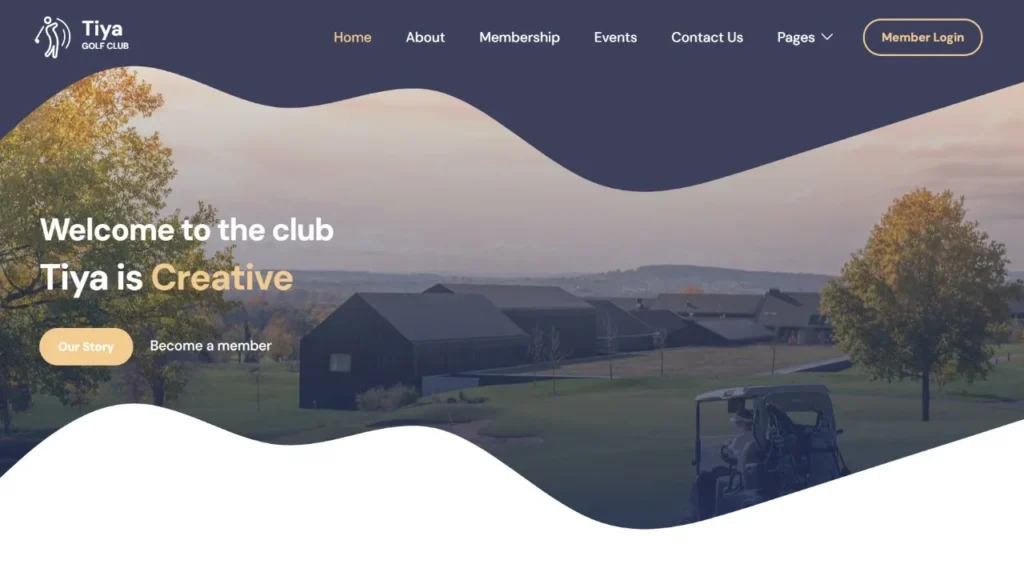
Features of our Free Template
- Instructional Resources
- Tee Time Booking
- News and Updates
- Course Directory
- Equipment Reviews and Recommendations
- Community Forums
- Handicap Tracking
- Pro Shop
- Fitness and Wellness Resources
- Golf Course Reviews and Ratings
- Coaching and Training Programs
- Event Calendar
How to Setup This Project on Your Local Machine
Follow these simple steps to download and run this project on your computer. This guide is beginner-friendly and perfect for students who are learning web development and working on college projects.
Step 1: Download the Project from GitHub
First, open the GitHub repository link of the project.
Click on the Code button and then select Download ZIP to download the project files to your computer.
You can also clone the repository using Git:
git clone https://github.com/rjksharma/project-name.git
Step 2: Extract the ZIP File
If you downloaded the ZIP file, extract it using any file extractor software like:
• WinRAR
• 7-Zip
• Windows Extract Tool
After extracting, open the project folder.
Step 3: Open the Project in VS Code
Download and install Visual Studio Code if you do not already have it installed.
Open VS Code and click on:
File → Open Folder
Select the extracted project folder.
Step 4: Install Live Server Extension
To run the project smoothly in your browser, install the Live Server extension in VS Code.
How to Install:
1. Open VS Code
2. Go to Extensions
3. Search for Live Server
4. Click Install
Step 5: Run the Project
Inside the project folder, locate the index.html file.
Right-click on index.html and select:
Open with Live Server
Your project will automatically open in the browser.
Step 6: Customize the Website
You can now edit:
• Text content
• Images
• Colors
• Sections
• Buttons
• Layout
All files are beginner-friendly and easy to customize for personal projects, portfolio websites, and college submissions
Requirements
Before running the project, make sure you have:
• A modern web browser (Chrome, Edge, Firefox)
• Visual Studio Code
• Internet connection (optional for fonts/icons)
Troubleshooting
If the project is not opening properly:
• Make sure all files are extracted correctly
• Check that index.html exists in the root folder
• Try reopening the project in VS Code
• Ensure Live Server is installed properly
Final Note
This free project source code is shared for educational and learning purposes. Students and beginner developers can use it to improve their frontend development skills and understand real-world website structure and design.